Publix Super Markets, founded in 1930, is one of America’s favorite employee-owned supermarket chains, operating over 1,300 stores across Florida, Georgia, Alabama, South Carolina, North Carolina, Tennessee, Virginia, and beyond. Known for fresh produce, bakery items, deli subs, and excellent customer service, Publix makes online ordering easy and convenient through dedicated mobile apps.
In 2025, Publix partners with Instacart for grocery delivery and curbside pickup. There’s a separate Publix app for in-store tools like weekly ads, digital coupons, shopping lists, and ordering deli items for in-store pickup.
Note: Online grocery prices may be slightly higher than in-store.
This step-by-step guide helps you order groceries via smartphone for delivery or curbside pickup.
Key Features of the Publix Mobile App
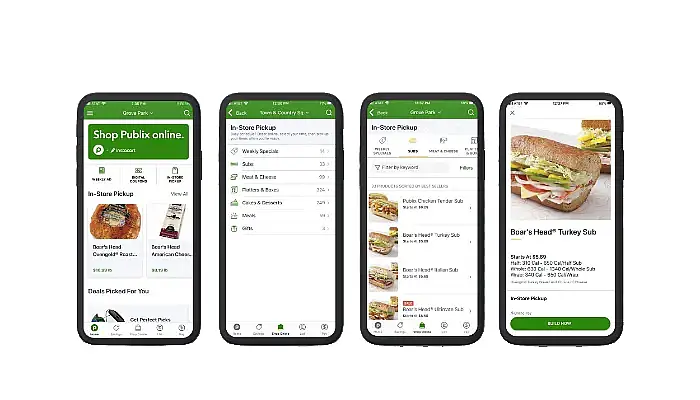
The Publix app (available on Android and iOS) is your go-to tool for making grocery shopping easier, faster, and more rewarding. It’s designed for in-store planning, savings, and convenience, while full grocery delivery and curbside pickup are handled through the separate Publix Delivery & Curbside app (powered by Instacart).
Here are the standout features of the main Publix app:
- Quick and Easy Signup/Login : Sign up in minutes with your phone number, email, and basic details. Link your Club Publix account for personalized deals, digital coupons, and perks like birthday treats.
- Weekly Ads, BOGOs, and Personalized Savings : Browse the latest weekly ads, hot deals, and Buy One Get One (BOGO) offers. Clip digital coupons directly in the app — they apply automatically when you enter your phone number at checkout. Get hand-picked deals based on your shopping history.
- Smart Shopping Lists : Build and manage shopping lists with ease. Add items from weekly sales, your purchase history, favorites, or by scanning barcodes in-store. The app organizes items by aisle for faster shopping and even suggests stock availability.
- In-Store Pickup for Deli, Subs, Cakes & More : Order fresh Publix subs, platters, cakes, and flatbreads right in the app for quick in-store pickup. Customize your order (e.g., extra pickles!) and get notified when it’s ready.
- Mobile Pay for Faster Checkout : Add your payment card and use Mobile Pay at checkout — scan, pay, and go without pulling out your wallet. Secure and contactless.
- Store Locator and In-Store Tools : Find nearby Publix stores, check hours, and get aisle locations for items. Use barcode scanning for quick list additions or price checks.
Additional Benefits
- User-Friendly Navigation: Intuitive design with tabs for Savings, Lists, Pay, and more — perfect for new and frequent users.
- Time and Money Savings: Personalized offers, easy reordering from history, and seamless integration with Club Publix help you save big every trip.
- Convenience Anywhere: Plan your shop from home, get notifications for deals, and make in-store shopping a breeze.
- No Extra Tools Needed: Everything in one app for planning and in-store use (delivery via the separate app).
For full online grocery ordering with delivery or curbside pickup, download the Publix Delivery & Curbside app — it offers real-time shopping, shopper chat, reordering, and fast delivery (as quick as 1 hour in many areas).
How to Order at Publix App Using Your Smartphone
Step 1: Download the Right App
- For grocery delivery or curbside pickup:
Download the Publix Delivery & Curbside app (powered by Instacart).- iOS: App Store
- Android: Google Play
- For weekly ads, digital coupons, shopping lists, and deli/cake in-store pickup: Use the main Publix app.
- This complements online ordering but doesn’t handle full grocery delivery/pickup.
Step 2: Create an Account and Link Club Publix
- Open the Publix Delivery & Curbside app.
- Sign up or log in with an Instacart account (quick via email, Google, or Apple).
- To maximize savings:
- Join Club Publix (free loyalty program) at clubpublix.com or in the main Publix app.
- In the Delivery app: Tap the menu (three lines) > “Loyalty cards” > Add your Club Publix phone number.
- This applies most BOGOs, weekly sales, and perks
(note: clipped digital coupons don’t always transfer fully to Instacart).
Step 3: Shop for Groceries
- Enter your ZIP code to check availability (available in most Publix areas).
- Browse categories, search items, or reorder from past purchases.
- View weekly ads and sales directly in the app.
- Add items to your cart – shoppers pick fresh produce, check dates, and allow real-time substitutions or chats.
Step 4: Choose Delivery or Curbside Pickup
- Delivery: Same-day in as fast as 1 hour (or scheduled). In select areas like Miami and Atlanta, 15-minute delivery via Instacart’s quick commerce.
- Curbside Pickup: Select a time slot, drive to reserved spots, notify via app – a Publix associate loads your car.
- Add prescriptions: Prepay via Publix Pharmacy app/site, then schedule via Instacart ($2 fee with groceries).
Step 5: Checkout and Pay
- Review cart, add instructions or tips.
- Fees: Delivery $3.99–$9.99 + service fee; curbside often lower/free on first orders.
- Payment: Credit/debit, Apple/Google Pay, SNAP/EBT. No Publix gift cards for fees.
- Place order and track in real-time.
Tips for the Best Experience
- Shop during off-peak times for more slots.
- Link Club Publix early for max savings.
- For deli/subs/cakes: Use the main Publix app for in-store pickup ordering.
- Issues with order? Contact Instacart support in-app (Publix handles in-store concerns).
Customer Support
- Publix Customer Care: Call 1-800-242-1227 (Mon-Fri, typical business hours) or use the contact form at publix/contact.
- For delivery/curbside issues: Use Instacart support in the app.
- Feedback? Complete the survey at www.publixsurvey.com for a chance to win a $1,000 gift card!